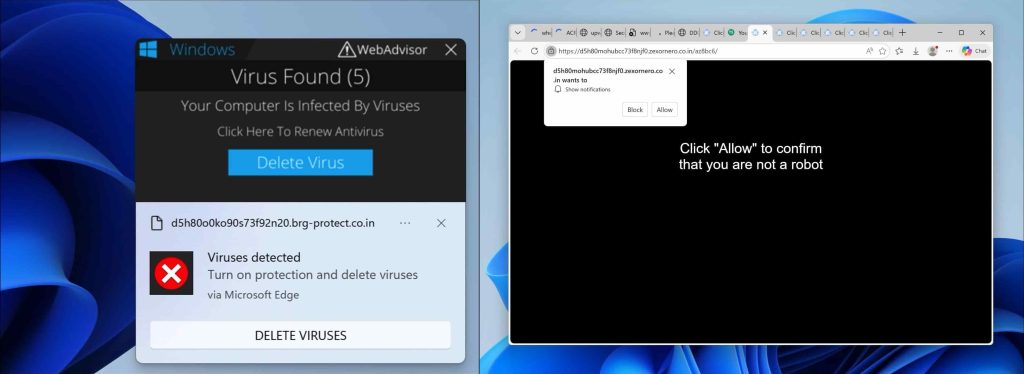
Websafetyframework.com pop-up ads will appear in your browser if you have accepted push notifications from Websafetyframework.com ads.
Websafetyframework.com notifications will be displayed in the Google Chrome browser (including Android or iOS), Firefox browser, Edge browser, or Safari browser. The notifications appear as pop-ups in the lower right corner of Windows or on your mobile device, for example, an Android tablet or phone or iPad or iPhone.
Websafetyframework.com advertisements are the result of rogue websites that redirect users to Websafetyframework.com after a visit, and there try to convince the user to press the “allow” button on the web browser.
I found the following Websafetyframework.com domain information:
   Domain Name: WEBSAFETYFRAMEWORK.COM

   Registry Domain ID: 3042565084_DOMAIN_COM-VRSN

   Registrar WHOIS Server: whois.registrar.amazon

   Registrar URL: http://registrar.amazon.com

   Updated Date: 2025-11-27T12:53:44Z

   Creation Date: 2025-11-27T12:43:26Z

   Registry Expiry Date: 2026-11-27T12:43:26Z

   Registrar: Amazon Registrar, Inc.

   Registrar IANA ID: 468

   Registrar Abuse Contact Email: trustandsafety@support.aws.com

   Registrar Abuse Contact Phone: +1.2024422253

   Domain Status: ok https://icann.org/epp#ok

   Name Server: NS-1449.AWSDNS-53.ORG

   Name Server: NS-199.AWSDNS-24.COM

   Name Server: NS-2009.AWSDNS-59.CO.UK

   Name Server: NS-914.AWSDNS-50.NET

   DNSSEC: unsigned

   URL of the ICANN Whois Inaccuracy Complaint Form: https://www.icann.org/wicf/

>>> Last update of whois database: 2026-01-13T17:56:05Z <<<


For more information on Whois status codes, please visit https://icann.org/epp


NOTICE: The expiration date displayed in this record is the date the

registrar's sponsorship of the domain name registration in the registry is

currently set to expire. This date does not necessarily reflect the expiration

date of the domain name registrant's agreement with the sponsoring

registrar.  Users may consult the sponsoring registrar's Whois database to

view the registrar's reported date of expiration for this registration.


TERMS OF USE: You are not authorized to access or query our Whois

database through the use of electronic processes that are high-volume and

automated except as reasonably necessary to register domain names or

modify existing registrations; the Data in VeriSign Global Registry

Services' ("VeriSign") Whois database is provided by VeriSign for

information purposes only, and to assist persons in obtaining information

about or related to a domain name registration record. VeriSign does not

guarantee its accuracy. By submitting a Whois query, you agree to abide

by the following terms of use: You agree that you may use this Data only

for lawful purposes and that under no circumstances will you use this Data

to: (1) allow, enable, or otherwise support the transmission of mass

unsolicited, commercial advertising or solicitations via e-mail, telephone,

or facsimile; or (2) enable high volume, automated, electronic processes

that apply to VeriSign (or its computer systems). The compilation,

repackaging, dissemination or other use of this Data is expressly

prohibited without the prior written consent of VeriSign. You agree not to

use electronic processes that are automated and high-volume to access or

query the Whois database except as reasonably necessary to register

domain names or modify existing registrations. VeriSign reserves the right

to restrict your access to the Whois database in its sole discretion to ensure

operational stability.  VeriSign may restrict or terminate your access to the

Whois database for failure to abide by these terms of use. VeriSign

reserves the right to modify these terms at any time.


The Registry database contains ONLY .COM, .NET, .EDU domains and

Registrars.
Websafetyframework.com is a social engineering trick to mislead users and is only intended to trick you into clicking on the ads that Websafetyframework.com displays. Clicking on the Websafetyframework.com ads will redirect you to multiple dangerous websites and make revenue for cybercriminals.
In most cases, your computer is most likely not infected with adware or malware, but there is only a web browser setting that needs to be removed to remove the Websafetyframework.com advertisements from your device. I do recommend to check your computer for malware with Malwarebytes.
In this article, I will explain per web browser how to remove the notifications and advertisements from the Websafetyframework.com domain from the web browser settings.
Please follow the steps below to remove Websafetyframework.com.
How to remove Websafetyframework.com?

Google Chrome
- Open Google Chrome.
- Click on the Chrome menu button in the top-right corner.
- Click on Settings.
- Click on Privacy and Security.
- Click Site settings.
- Click on Notifications.
- Click on the Remove button next to Websafetyframework.com.
Disable notifications in Google Chrome
- Open the Chrome browser.
- Click on the Chrome menu button in the top-right corner.
- Click on Settings.
- Click on Privacy and security.
- Click on Site settings.
- Click on Notifications.
- Click on “Don’t allow sites to send notifications” to disable notifications.

Android
- Open Google Chrome
- Tap on the Chrome menu button.
- Tap on Settings and scroll down to Advanced settings.
- Tap on the Site Settings section, tap the Notifications settings, find the Websafetyframework.com domain, and tap on it.
- Tap the Clean & Reset button.
Problem solved? Please share this page, Thank you SO much.

Firefox
- Open Firefox
- Click on the Firefox menu button.
- Click on Options.
- Click on Privacy & Security.
- Click on Permissions and then to Settings next to Notifications.
- Click on the Websafetyframework.com URL and change the status to Block.

Internet Explorer
- Open Internet Explorer.
- In the top right corner, click on the gear icon (menu button).
- Go to Internet Options in the menu.
- Click on the Privacy tab and select Settings in the pop-up blockers section.
- Find the Websafetyframework.com URL and click the Remove button to remove the domain.

Microsoft Edge
- Open Microsoft Edge.
- Click on the Edge menu button.
- Click on settings.
- Click on Cookies and site permissions.
- Click on Notifications.
- Click on the “more” button right next to the Websafetyframework.com URL.
- Click on Remove.
Disable notifications in Microsoft Edge
- Open Microsoft Edge.
- Click on the Edge menu button.
- Click on settings.
- Click on Cookies and site permissions.
- Click on Notifications.
- Turn the switch “Ask before sending (recommended)” off.

Safari
- Open Safari.
- Click in the menu on Preferences.
- Click on the website tab.
- In the left menu click on Notifications
- Find the Websafetyframework.com domain and select it, click the Deny button.
Combo Cleaner is a cleaning and antivirus program for Mac, PC, and Android devices. It is equipped with features to protect devices from various types of malware, including spyware, trojans, ransomware, and adware. The software includes tools for on-demand scans to remove and prevent malware, adware, and ransomware infections. It also offers features like a disk cleaner, big files finder (free), duplicate files finder (free), privacy scanner, and application uninstaller.
Follow the installation instructions to install the application on your device. Open Combo Cleaner after installation.
- Click the "Start scan" button to initiate a malware removal scan.
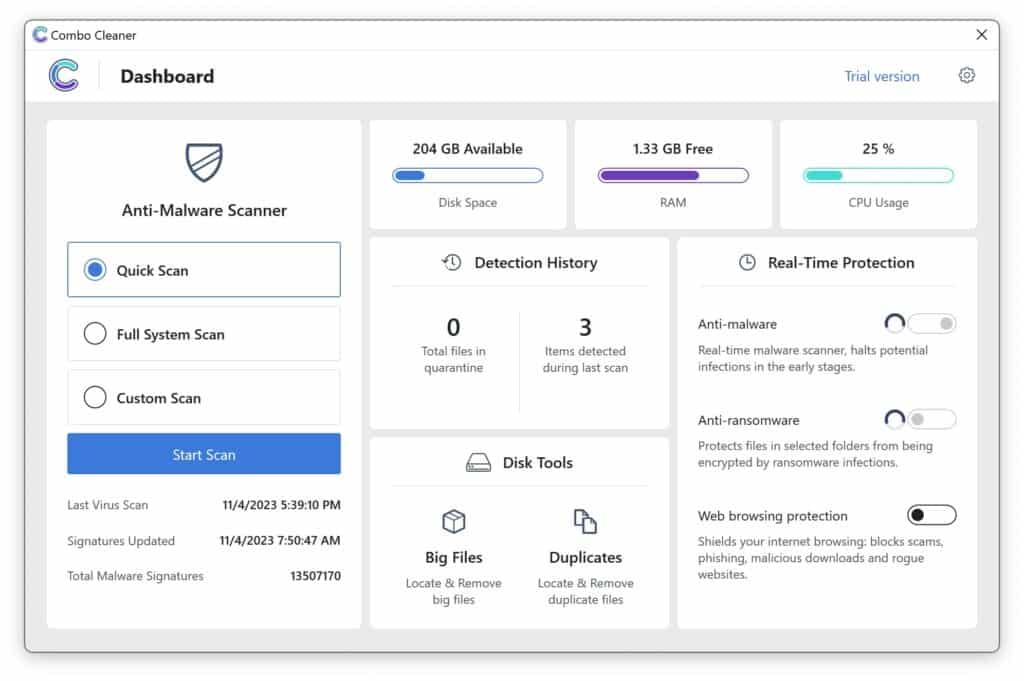
- Wait for Combo Cleaner to detect malware threats on your computer.
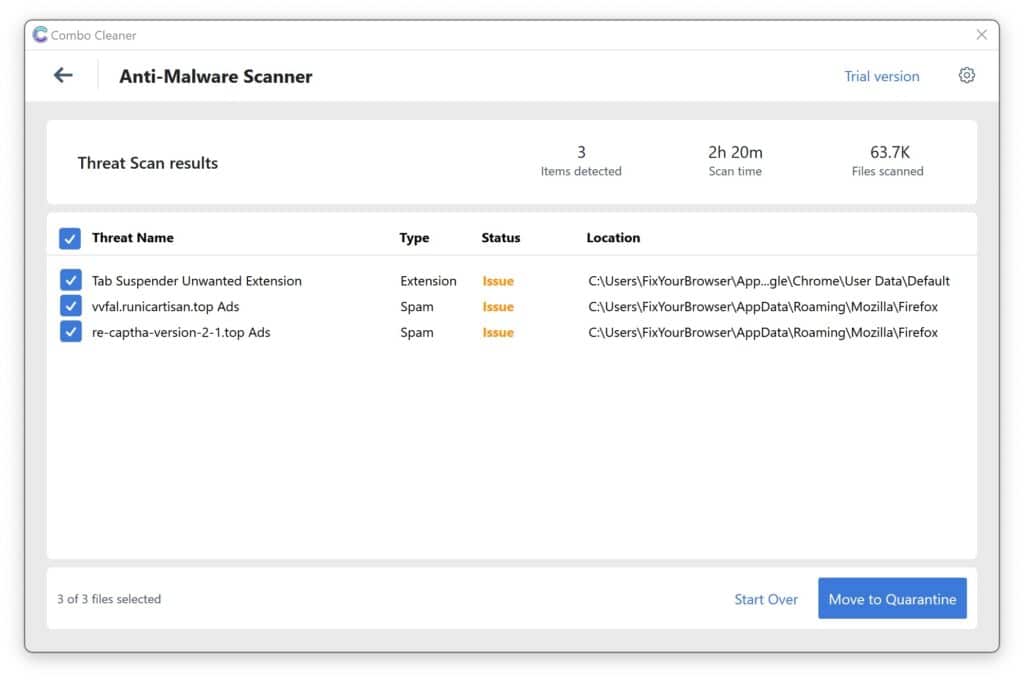
- When the Scan is finished, Combo Cleaner will show the found malware.
- Click "Move to Quarantine" to move the found malware to quarantine, where it can't harm your computer anymore.
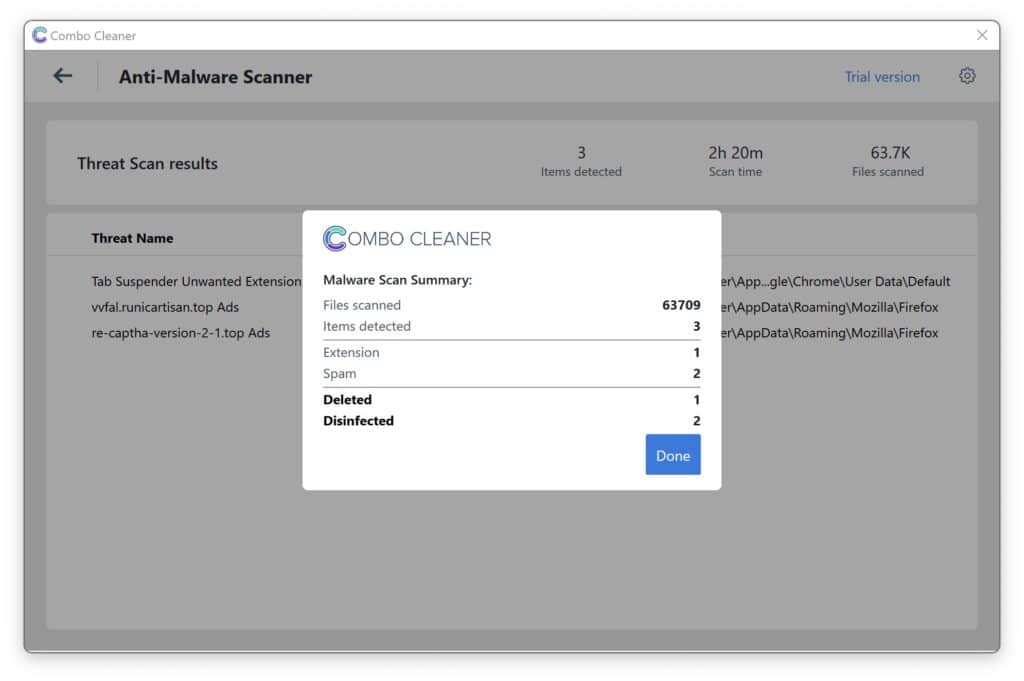
- A malware scan summary is shown to inform you about all threats found.
- Click "Done" to close the scan.
Use Combo Cleaner regularly to keep your device clean and protected. Combo Cleaner will remain active on your computer to protect your computer from future threats that try to attack your computer. If you have any questions or issues, Combo Cleaner offers a dedicated support team available 24/7.